Hand Illustrated Wood Texture Vector: A Practical Review for Designers
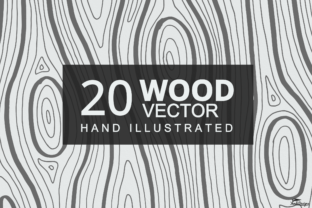
When building a visual project, the choice of texture can shift the entire feel of the composition. Wood textures, in particular, bring warmth, organic rhythm, and a sense of natural materiality that many digital assets struggle to replicate convincingly. The Hand Illustrated Wood Texture Vector set offers a distinctive approach to this need, providing twenty hand-drawn wood textures created with fine pen and brush pen. This article evaluates the set from a practical standpoint, examining what it includes, where it excels, where it may fall short, and how to decide if it fits your specific workflow.
What Is the Hand Illustrated Wood Texture Vector Set?
This resource is a collection of twenty wood texture vector files, each produced through hand illustration rather than purely algorithmic generation. The textures were drawn using fine pen and brush pen techniques, then digitized and converted into editable vector formats. The set is designed to be used across a range of applications including art projects, backgrounds, patterns, and general graphic elements. Because the textures are vector-based, they can be recolored and scaled without loss of quality, making them more flexible than static raster images in many design scenarios.
The deliverables include native files in Adobe Illustrator (AI CS2), EPS 10, Affinity Designer (afdesign), Photoshop (PSD), and SVG formats that are compatible with Inkscape. Additionally, twenty PNG files are provided at 5000 x 3333 pixels for quick placement or preview use. An information text file accompanies the package. It is important to note that the textures are explicitly described as not tileable, which influences how they can be applied across larger surfaces.
Why Designers and Artists Might Consider This Set
Several factors make the Hand Illustrated Wood Texture Vector set worth evaluating. First, the hand-drawn origin of the textures gives them a quality that differs from purely procedural or photographic wood grain. The irregularity of pen and brush strokes introduces subtle variations that can read as more organic or expressive, depending on the context. For projects that aim for an illustrative, sketch-like, or artisan feel, this can be a meaningful aesthetic advantage.
Second, the multi-format support lowers barriers to entry. Users of Inkscape, Adobe Illustrator, Affinity Designer, or even Photoshop can open and edit the files without needing to convert or redraw anything. The inclusion of SVG files specifically addresses users who prefer open standards or work in environments where proprietary formats are less accessible.
Third, the ability to recolor the textures easily is a practical benefit. In vector editing software, each texture can be modified by adjusting fill colors, applying gradient overlays, or combining with other elements. This makes the set adaptable to different color palettes without requiring new illustrations.
Authentic Hand-Drawn Aesthetic
The most distinguishing feature of this set is the hand-illustrated origin. Unlike vector textures that are traced from photographs or generated entirely by software, these textures carry the micro-imperfections of real pen and brush work. This can be especially appealing in branding, editorial illustration, packaging, or any design where a human touch is part of the visual message.
Editable Vector Files
Because the textures are supplied in editable vector formats, users can modify individual strokes, change line weights, or delete portions of the texture. This level of control is not available with raster-only textures. For designers who need to adapt a wood grain to a specific shape or curve, the vector nature is a clear advantage.
High-Resolution PNGs for Quick Use
The inclusion of 5000 x 3333 pixel PNG files means that even users without vector editing software can immediately use the textures in raster-based projects at a good resolution. This dual delivery saves time when a quick integration is needed.
Broad Compatibility
Support for AI CS2, EPS 10, afdesign, PSD, and SVG means that the set can be opened in legacy software, current versions, and free alternatives like Inkscape. This reduces the risk of format incompatibility across different team members or studio setups.
Not Tileable
The set explicitly states that the textures are not tileable. This is a significant consideration for anyone planning to use them as repeating backgrounds over large areas, such as website backgrounds, wallpaper patterns, or textile prints. Without seamless tiling, applying the textures across broad surfaces will show obvious seams or require manual patchwork. For large-scale repeating applications, tileable textures or procedural approaches may be more appropriate.
Limited Number of Variations
Twenty textures provide a respectable starting point, but the set may feel constrained for projects that require a wide range of wood types, grain directions, or densities. Users seeking very specific grain patterns (oak, walnut, pine, zebrawood, etc.) may not find exact matches. The hand-drawn nature also means each texture has a distinct character, which may or may not align with every design brief.
Style Specificity
The pen-and-brush aesthetic is not neutral. It carries a strong illustrative voice that may not suit minimalist, ultra-realistic, or corporate design contexts. If the project requires photorealistic wood grain or a perfectly smooth vector approximation, these hand-drawn textures might feel out of place.
Format Considerations for Affinity and Inkscape Users
While afdesign and SVG files are included, compatibility may vary depending on the software version. EPS 10 files can be imported into most vector editors, but some effects or stroke properties may not translate exactly. It is advisable to test a sample file before purchase if you rely on a less common workflow.
Who Is This Set Best Suited For?
The Hand Illustrated Wood Texture Vector set is a strong fit in several scenarios:
- Illustrators and artists who want wood textures that match a hand-drawn style. The textures can be layered into digital illustrations, mixed with other vector elements, or used as base layers for further drawing.
- Graphic designers working on branding or packaging that aims for a natural, bespoke, or craft-oriented appearance. The non-tileable nature is less of a concern when textures are applied to labels, badges, or small areas.
- Designers using vector editing software who need editable wood grain for custom adjustments. The ability to recolor, scale, and modify the strokes directly is valuable for iterative design work.
- Hobbyists or students who want affordable, ready-to-use hand-drawn textures without needing to create them from scratch. The multiple formats reduce the learning curve for different tools.
When Alternatives May Be Worth Considering
There are situations where a different resource or approach might serve you better:
- If you need seamless repeating patterns for large backgrounds, tiles, or fabric design, look for tileable texture packs or consider generating procedural wood grain in software like Substance Designer or Blender.
- If photorealism is essential for a product mockup, architectural visualization, or realistic rendering, high-resolution photographic wood textures (or scanned wood grain maps) will likely outperform hand-drawn vectors.
- If you require a very specific wood species with unique grain characteristics (e.g., curly maple, rosewood, teak), a dedicated texture library with hundreds of options may be more suitable.
- If you work primarily in a non-vector environment such as a game engine or 3D application that relies on tiled diffuse maps, the non-tileable PNGs and vector files may require additional processing to become usable.
Practical Decision-Making Insights
To determine whether this set aligns with your goals, consider the following questions:
- What is the intended scale of use? If the textures will be applied to small to medium areas (postcards, icons, labels, headers, product details), the non-tileable limitation is less likely to be a problem. If they need to cover an entire page or screen background repeatedly, you will need to either manually blend seams or look elsewhere.
- How important is the hand-drawn look to your project? If the wood texture is meant to be a subtle background element, the illustrative quality might be too pronounced. If the wood is a featured decorative element, the hand-drawn style can become a signature part of the design.
- Do you have time to edit and adapt the files? The set is not a one-click solution for every wood texture need. To get the most out of it, you should be comfortable with vector editing software—adjusting stroke properties, layering, cropping, and recoloring. If you prefer ready-to-use textures that need no modification, the PNGs can serve that purpose, but only within the constraints of the provided composition.
- How does the cost compare to alternatives? Evaluate the price relative to other texture sets that offer tileable options, more variations, or higher resolution. The value here lies in the hand-drawn character and the flexibility of editable vectors, not in sheer quantity or seamlessness.
Conclusion
The Hand Illustrated Wood Texture Vector set delivers a specific, well-crafted aesthetic that can enhance projects where an organic, hand-drawn wood grain is desired. Its strengths include editable vector files, broad format support, and high-resolution PNGs for quick deployment. The primary limitation—non-tileable textures—defines its best-use scenarios: focused, limited-area applications rather than expansive repeating backgrounds. By matching the set's characteristics against your project requirements, you can decide whether it offers the right balance of creative potential and practical utility for your work.