Icecream Fruits Procreate Stamp Set for Digital Creators
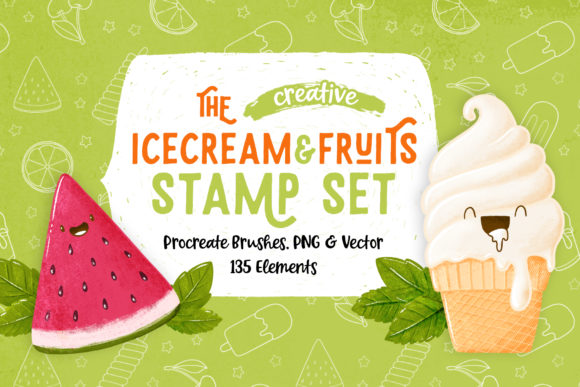
When you work with digital art or design, having the right set of tools can make the difference between a project that feels forced and one that flows naturally. The Icecream Fruits Procreate Stamp Set offers exactly that kind of ease, combining playful summer imagery with practical versatility. Whether you are a seasoned illustrator or someone who simply enjoys making things look beautiful, this collection of 135 stamps brings a fresh, approachable way to add charm to your work without starting every element from scratch.
This set includes more than just Procreate brushes. You also get PNG files with transparent backgrounds, JPG files with white backgrounds, and vector files in Adobe Illustrator AI and EPS formats. That means even if you don't use Procreate, you can still work with every single stamp. The elements are organized by theme and placed on separate layers, so you can find what you need quickly and keep your workflow smooth.
What Makes This Stamp Set Stand Out
The core appeal of this set lies in its range and thoughtfulness. You get cones, ice creams, popsicles, and fruits, all drawn in a consistent, cute style that feels cohesive without being repetitive. The stamps are designed to be mixed and matched, which opens up a lot of creative possibilities. You are not locked into pre-made compositions; instead, you have building blocks that you can arrange, resize, rotate, and layer however you like.
For those who use Procreate on an iPad, installing the brushset is straightforward. Once loaded, you simply tap to stamp onto your canvas. The stamps respond well to pressure and size adjustments, giving you control over how bold or subtle each element appears. If you work in other software, the PNG, JPG, and vector files give you the same flexibility. This cross-compatibility is a practical advantage, especially if you collaborate with others or switch between tools.
Creative Possibilities for Everyday Projects
One of the most immediate uses for this set is creating patterns. Because the stamps are individual elements, you can build repeating backgrounds for fabrics, wallpapers, or digital stationery. Imagine a pattern of alternating popsicles and strawberry slices, or a grid of ice cream cones with different toppings. The consistent style ensures the pattern looks intentional and polished, even if you arrange the elements quickly.
Another strong application is in bullet journaling. Many people enjoy decorating their journals but lack the time or drawing skill to create elaborate illustrations every day. With these stamps, you can add a small ice cream cone to mark a summer memory, or use a fruit stamp to highlight a goal related to health or productivity. The PNG format works especially well here because you can drop the transparent images directly into digital planners or print them out for physical journals.
Sticker-making is another natural fit. The cute, clean style translates well to small formats, and the vector files allow you to scale the stamps without losing quality. You can create sticker sheets for personal use, for gifts, or even for a small shop. Mix fruits with ice creams to build themed sets like a summer collection or a tropical bundle. The transparent PNGs also make it easy to cut around the shapes if you use a cutting machine.
Using the Stamps to Beat Creative Blocks
Every creative person hits a point where nothing seems to work. The blank canvas feels intimidating, and no idea feels good enough. In those moments, having a set of ready-made stamps can be surprisingly helpful. Instead of forcing yourself to draw something from scratch, you can start by stamping a few elements at random. Place a cone here, a fruit there, then step back and see what the composition suggests. Sometimes the act of placing a few simple shapes is enough to trigger a new idea or direction.
This approach works because it lowers the barrier to starting. You are not committing to a finished piece; you are just playing. The stamps become prompts, and before long, you might find yourself adding details, combining stamps in unexpected ways, or building a scene that you would not have planned in advance. The mix of fruits and frozen treats gives you a natural palette of colors and shapes to work with, which also helps when you are feeling stuck.
Practical Applications for Different Audiences
This set is not limited to one type of creator. Different users will find different values depending on their goals and platforms.
Designers and illustrators can use the stamps as time-saving assets in client projects. Need a quick illustration for a summer-themed social media post? Stamp a few ice creams and fruits, add some typography, and you have a clean, on-brand graphic. The vector files also make it easy to customize colors or combine stamps with other design elements without worrying about resolution.
Marketers and small business owners can use the stamps to create consistent visual content. A café or ice cream shop could use the images in menu designs, promotional flyers, or Instagram stories. A health-focused brand might use the fruit stamps to reinforce fresh, natural messaging. Because the style is friendly and approachable, it fits well with brands that want to feel warm and relatable without being overly childish.
Educators and hobbyists will appreciate how easy the set makes it to create visual aids or decorative materials. Teachers can build worksheets, reward charts, or classroom decorations with the stamps. Hobbyists can use them in scrapbooking, photo editing, or making personalized gifts. The JPG files with white backgrounds are especially useful for quick print projects where you want the stamps to stand out.
Bloggers and content creators can integrate the stamps into blog graphics, Pinterest pins, or YouTube thumbnails. The consistent style helps maintain a cohesive look across different pieces of content, which is important for building a recognizable brand. The transparent PNGs also make it easy to overlay stamps on photos without awkward edges.
Keeping Your Results Clear and Organized
Working with a large set of stamps requires a little organization, especially when you have 135 elements spread across multiple formats. Here are a few practical recommendations to keep your workflow efficient without losing creative momentum.
- Name your layers clearly. Whether you are in Procreate, Photoshop, or Illustrator, take a moment to label each layer with the stamp name or theme. This saves time when you need to adjust a specific element later.
- Use color coding or grouping. In Procreate, you can group stamps by theme. In vector software, place different themes on separate layers as the set already provides. This keeps your workspace clean and makes it easier to experiment with variations.
- Create a master library file. Open a new document and place all the stamps you use most often. Save this as a template so you can copy and paste stamps into new projects without digging through folders each time.
- Test scale and rotation early. Some stamps look different when scaled up or rotated. Try a few variations early in your project to see how the stamps behave at different sizes, especially if you are using the Procreate brushes where pressure sensitivity can affect the stamp appearance.
Combining Stamps for Unique Compositions
The real strength of this set becomes visible when you start combining elements in unexpected ways. Because the stamps share a consistent visual style, you can mix fruits with ice creams, cones with popsicles, and create scenes that feel both playful and cohesive. Here are a few composition ideas to try.
Build a ice cream sundae by stacking a cone, a scoop, and a fruit on top. Add multiple scoops by layering different stamps, adjusting the size so they fit naturally. Use the fruit stamps as toppings or garnishes around the base. This works well for menu illustrations or decorative posters.
Create a grid pattern by alternating stamps in a checkerboard layout. Use a fruit stamp for the squares and an ice cream stamp for the in-between spaces. The result is a repeating pattern that feels custom-made and can be used for wrapping paper, notebook covers, or digital backgrounds.
Make a scene by placing stamps at different depths. Put larger stamps in the foreground and smaller ones in the background to create a sense of space. Add a few scattered fruits around the edges to frame the composition. This technique turns a simple stamp layout into something that looks more like a designed illustration.
Adapting the Set for Different Platforms and Formats
The way you use these stamps might change depending on where you share or publish your work. Social media platforms often favor high-contrast, clean visuals, and the cute style of these stamps fits well with Instagram, TikTok, and Pinterest. For Instagram, try building a carousel post where each slide features a different stamp composition. For Pinterest, create pin graphics that combine a stamp with a short quote or title.
For print projects, the vector and JPG files give you flexibility. You can scale vector stamps to any size without losing sharpness, which is useful for posters or banners. For smaller print items like stickers or tags, the PNG files with transparent backgrounds are ideal because they let you place the stamp on any colored paper or surface.
If you work with digital planners or note-taking apps, the transparent PNGs can be imported directly and used as decorative elements. You can resize them to fit into calendar cells, habit trackers, or mood boards. The consistent style helps your digital planner look cohesive without requiring hours of manual drawing.
Practical Inspiration for Getting Started
If you are unsure where to begin, try one of these simple projects to get comfortable with the stamps. Each project uses a different file format and targets a different outcome, so you can see how the set works across contexts.
- Quick social media post: Open Procreate, stamp a cone in the center, add a fruit on top, and type a short message like "Summer vibes." Export as PNG and post. This takes under five minutes and gives you a polished graphic.
- Pattern for a notebook cover: In Illustrator or with the vector files, arrange stamps in a repeating grid. Adjust colors if needed. Export as PDF and print. This gives you a custom cover that looks professional.
- Sticker sheet: In Photoshop or any photo editing software, open a new document and place multiple transparent PNG stamps. Arrange them in rows, leaving space around each. Print on sticker paper and cut. This is a quick way to create a themed sticker set.
- Digital journal spread: Import transparent PNGs into your note-taking app. Place a fruit stamp at the top of a page as a header, and use an ice cream stamp as a bullet point marker. This adds visual interest without cluttering the layout.
Each of these projects uses the same stamps but results in a different type of output. That flexibility is what makes this set useful for a wide range of creators, from those who need quick assets to those who want to build something more elaborate.
Keeping the Style Consistent Across Projects
One challenge when using stamps from any set is maintaining a consistent look, especially if you combine them with other elements. Because the Icecream Fruits Stamp Set has a unified design language, it is easier to keep everything feeling connected. To preserve that consistency, try to use the stamps at similar scales within a single project. Avoid mixing them with assets that have a completely different line weight or color palette, unless you intentionally want contrast.
If you edit the stamps, for example by changing colors or adding effects, try to apply the same treatment to all stamps in the project. This ensures that even if the original style shifts, the set remains visually cohesive. For vector users, global color changes are straightforward. For Procreate users, adjusting hue or saturation on a group layer is a quick way to unify the look.
A Set That Grows With Your Needs
The Icecream Fruits Procreate Stamp Set is not just a one-time asset. Because it includes multiple file formats and 135 distinct elements, it can serve you across different projects, platforms, and skill levels. Whether you are making a quick sticker for a friend, building a pattern for a client, or decorating your own journal, the stamps provide a reliable foundation that saves time and encourages creativity. The mix of fruits and frozen treats gives you a natural theme that works for summer, tropical, or playful projects, but the elements are versatile enough to fit into other contexts with a little creative adjustment.
By keeping your workspace organized, experimenting with combinations, and adapting the stamps to your specific output format, you can get consistent, attractive results without overcomplicating the process. That balance between ease and versatility is what makes this set a practical addition to any digital creator's toolkit.