Nightshade. Seamless Patterns: A Practical Guide to Versatile Floral Designs for Creative Workflows
Pattern design is one of those creative resources that can either elevate a project or become a bottleneck when the wrong assets are chosen. The Nightshade. Seamless Patterns collection offers six distinct floral seamless patterns built for flexibility across print, digital, and packaging work. Each pattern comes in multiple file formats including EPS, JPG, PNG, SVG, and AI, making it a practical choice for designers, small business owners, and content creators who need reliable, repeatable artwork without the overhead of creating patterns from scratch.
This article walks through what the collection offers, where it fits into real workflows, and how to get the most out of these assets for gift packaging, wallpaper design, fabric printing, and more. No fluff, just practical implementation guidance.
Understanding the Nightshade. Seamless Patterns Collection
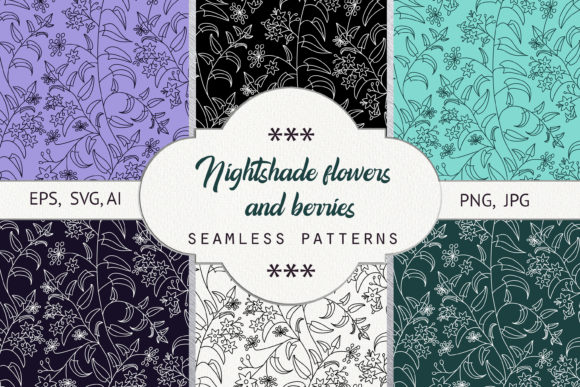
The collection centers on six floral seamless patterns, each paired with a specific color treatment and background combination. Every pattern variant includes the same core set of five file formats: EPS, JPG, PNG, SVG, and AI. This means you have vector scalability, raster previews, transparent PNGs for layering, and native Illustrator files all in one purchase. The resolution is 300 dpi with RGB color, which covers both print and screen use out of the box.
The six variations break down as follows:
- White outline on a black background
- Black outline on a white background
- Light outline on a green background
- Dark outline on a light green background
- Light outline on a dark purple background
- Dark outline on a light purple background
This range of contrasts and color moods gives you immediate options for light, dark, and mid-tone applications. Whether you need a high-contrast pattern for product labels or a subtle floral for fabric, the collection provides a starting point that can be further customized or used as-is.
Where Seamless Patterns Fit in a Creative Workflow
The real value of a seamless pattern collection lies not just in the aesthetics but in how it integrates into your existing process. Nightshade. Seamless Patterns fits naturally at multiple stages of a project, depending on your role and goals.
Before a Project: Planning and Asset Selection
When you are scoping a new product line or design project, having a ready-to-use pattern library saves time during the planning phase. Instead of pausing to design a custom repeat pattern, you can browse the six options and select a direction that matches your brand palette or project theme. For example, if you are planning a spring packaging run, the light outline on green or dark outline on light purple patterns may align with pastel or botanical themes. The black-and-white variants are strong candidates for monochrome branding or minimalist gift wrap.
Because each pattern includes both light and dark background versions, you can quickly evaluate how the artwork reads on different substrates without needing to invert colors manually. This speeds up early decision-making and lets you move faster into production.
During a Project: Implementation and Customization
Once you are in the execution phase, the file format variety becomes the main advantage. The AI and EPS files allow vector editing, so you can recolor elements, scale the pattern independently, or combine motifs from different variants. The SVG files are useful for web and digital applications where small file sizes and responsive scaling matter. The PNG files with transparent backgrounds let you overlay the pattern onto textures, photographs, or other design elements without clipping issues. The JPG files serve as quick placeholders or final assets for print mockups.
If you work with tools like Adobe Illustrator, Affinity Designer, or even web-based platforms like Canva (which supports SVG and PNG imports), the pattern files drop directly into your workspace. No conversion steps, no format troubleshooting. This reduces friction during the design process and keeps your focus on composition and layout rather than file preparation.
After a Project: Quality Control and Consistency
After a design is finalized, patterns often need to hold up across different outputs. The 300 dpi resolution ensures print-ready quality for small runs of gift tags, wrapping paper, or fabric samples. The RGB color profile is standard for digital displays, but if you are printing, you can convert to CMYK from the AI or EPS files without losing the seamless repeat. The consistent file naming and structure across all six variants also make it easy to archive the assets for future reuse.
Practical Use Cases Across Industries
The versatility of the Nightshade. Seamless Patterns collection means it serves multiple professional contexts. Here are some of the most practical applications.
Gift Packaging and Product Presentation
Small business owners who sell physical products often need branded packaging that stands out. The six patterns can be applied to wrapping paper, gift boxes, tissue paper inserts, or product labels. Because the patterns are seamless, you can tile them across large sheets without visible seams, which is critical for professional-looking packaging. The high-contrast outlines (white on black, black on white) work well for luxury or minimalist brands, while the colored backgrounds suit artisanal or nature-inspired product lines.
Wallpaper and Surface Design
Interior designers, home decor sellers, and digital wallpaper creators can use the patterns for mockups or final designs. The vector formats allow scaling to wall-sized repeats without resolution loss. If you need to adjust the pattern density or rotate elements for a specific room layout, the AI file gives you full control. The light and dark variants also help you test how the pattern looks in different lighting conditions before committing to a print run.
Fabric and Textile Printing
For fashion designers, fabric printers, or hobbyists creating custom textiles, the EPS and AI files are industry-standard formats for textile design software. The seamless nature of the repeat ensures that yardage prints continuously without awkward breaks. The 300 dpi resolution meets the minimum requirement for most sublimation and digital fabric printing services. If you need to create colorways for different fabric runs, the vector files allow batch recoloring in minutes.
Digital Content and Brand Assets
Bloggers, content creators, and social media managers can use the PNG and SVG files for website backgrounds, social media templates, or email headers. The transparent PNG files are especially useful for layering over photographs or brand colors without additional masking work. The SVG files keep file sizes small for fast-loading web pages, which is a plus for SEO and user experience.
Integration with Other Tools and Platforms
The collection is designed to work across a wide range of software, which matters when you collaborate with others or switch between tools. The AI files are native to Adobe Illustrator and preserve layers, groups, and editable vector shapes. The EPS files are compatible with older design software, vector editors, and some open-source alternatives like Inkscape. The SVG files open in web browsers, Canva, Figma, and most modern design apps. The PNG and JPG files are universal and work in any image editor or document layout tool.
If you use a print-on-demand service like Printful, Redbubble, or Society6, you can upload the EPS or AI files directly for product listings. If you are a freelance designer delivering assets to a client, providing all five formats ensures the client can open and use the pattern regardless of their software setup. This reduces back-and-forth support requests and improves the overall client experience.
Practical Implementation Tips for Long-Term Use
To get the most out of the Nightshade. Seamless Patterns collection over time, treat the assets as a modular design system rather than one-off graphics. Here are some workflow-oriented tips.
Organize by Color and Contrast
Keep the six variants organized in a folder structure that reflects their visual properties. For instance, group the black-on-white and white-on-black patterns together as neutral high-contrast options. Group the green-background and light-green-background patterns as botanical tones. Group the purple-based patterns as accent or luxury options. This makes future project selection faster because you are searching by visual intent rather than file name.
Create Custom Variations from the Vector Files
Since the AI and EPS files are editable, spend an hour creating a few custom color variations that match your brand identity. Change the outline color to your brand accent, or flip the background to a custom hex value. Save these as new library assets. This extends the collection beyond the original six patterns and gives you exclusive assets that competitors don't have access to.
Use PNGs for Rapid Prototyping
When you are iterating on a layout quickly, the PNG files with transparent backgrounds are your fastest asset. Drop them into mockup templates, product photography, or web designs without waiting for vector rendering. Only switch to the vector formats when you need to scale up or edit the geometry. This separation of fast prototyping and final production saves time.
Maintain Consistent File Naming for Team Workflows
If you share the collection with a team or a client, rename the files consistently before distribution. Use a naming convention like "Nightshade_Color_Format" (e.g., "Nightshade_WhiteOnBlack_AI.ai"). This eliminates confusion and ensures everyone is working with the correct variant. The original files already follow a logical structure, but a standardized naming system across your entire asset library prevents version control issues.
Quality Control and Production Considerations
Before sending any pattern to print or publishing it digitally, perform a few quick quality checks. Open the EPS or AI file and zoom in to verify that the outlines are clean and that the repeat boundary is truly seamless. While the collection is designed to be seamless, confirming this in your software avoids surprises during production. Check the color profile: if you are printing commercially, convert the RGB file to CMYK using a printer-ready profile. If you are using the patterns for web, the RGB profile is already correct.
For fabric printing, request a strike-off or sample swatch from your printer to see how the pattern reads on the actual textile. The same pattern can look different on cotton versus polyester versus linen due to fabric texture and dye absorption. The 300 dpi resolution gives you flexibility, but substrate behavior matters more for final quality.
Long-Term Value and Reusability
The Nightshade. Seamless Patterns collection is not a one-time-use asset library. Because it includes multiple colorways and formats, you can repurpose it across seasons, product lines, and projects. The black-and-white variants are timeless and work year-round. The colored variants can be used for seasonal collections or limited-edition runs. The vector files allow you to update the patterns as your brand evolves, making the collection a long-term investment rather than a disposable purchase.
For educators and tutorial creators, the collection also serves as teaching material. You can use the files to demonstrate pattern creation, vector editing, or color theory in Adobe Illustrator classes without building examples from scratch. The seamless nature of the patterns makes them good case studies for understanding how repeats work in professional design.
Final Observations
The Nightshade. Seamless Patterns collection delivers exactly what it promises: six floral seamless patterns in multiple file formats with varied background treatments. The strength of the collection lies in its format completeness, the range of contrast options, and the immediate usability across gift packaging, wallpaper, fabric, and digital content. It removes the repetitive work of pattern creation and lets you focus on composition and application. Whether you are a small business owner preparing a holiday product line, a freelancer assembling client assets, or a hobbyist experimenting with textile printing, these patterns provide a solid foundation that can be adapted, scaled, and reused over time. The key is to integrate them into your workflow early, organize them intentionally, and take advantage of the vector formats for customization. That is how you turn a pattern collection into a lasting design resource.